Oct
24

Geek Out! Build Your Own Arduino Portal Turret

I’m a big time gamer. Always have been. And one of the neatest little games to come out in a while is Portal (and more recently Portal 2). It’s a fantastic first-person shooter puzzle game where your goal is to make your way across a test chamber (starting from the entrance and working your way to the exit) using a portal gun.

This gun does not fire harmful projectiles but rather allows you to open portals (i.e. inter-dimensional doors – one orange and one blue) in walls ceilings and floors. Walking through a blue portal allows you to appear wherever the orange portal is (and visa-versa). It’s this simple mechanism that allows for some brilliant and challenging abstract game-play.

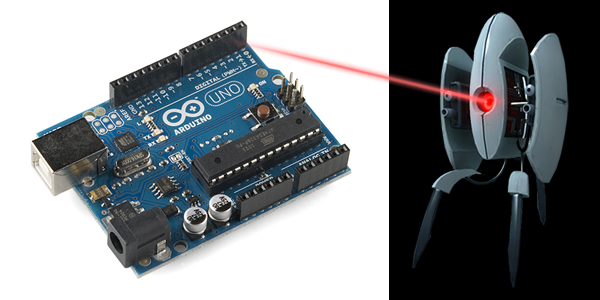
One of the cute little obstacles you will encounter are Portal Turrets which stand sentry in various locations happily waiting to shred you to tiny little pieces with their machine guns.

Though deadly, they are cute little buggers and with a little Arduino magic I set out to create one; or more accurately emulate its behavior.
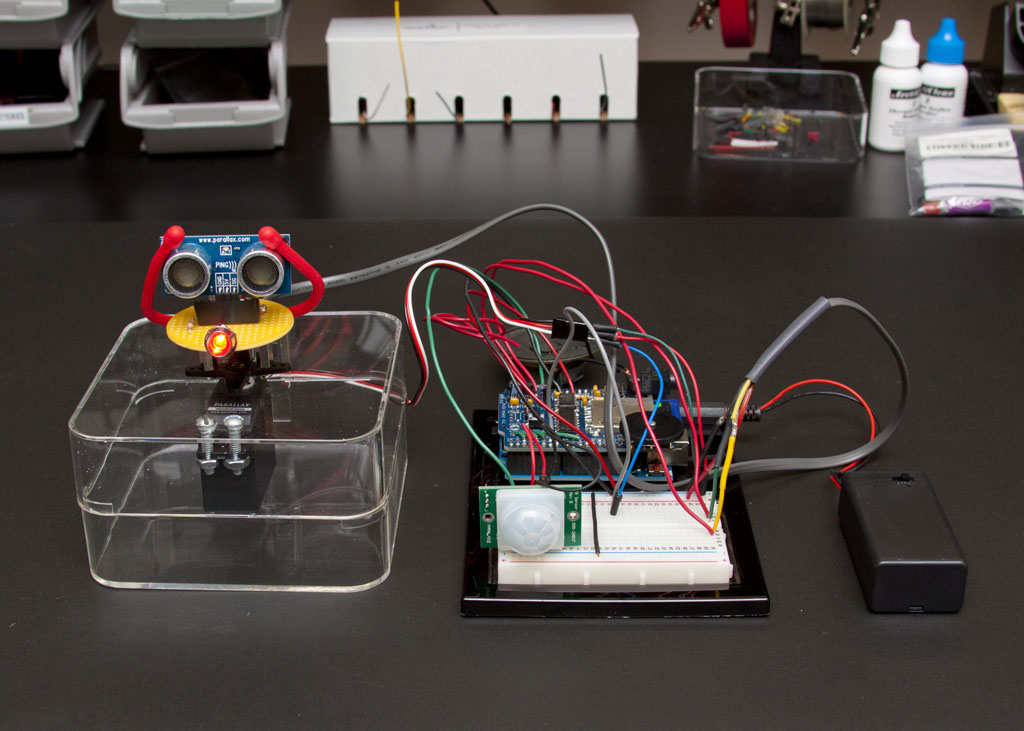
Arduino Portal Turret In Action

Project Description

Replicates the behavior of a Portal Turret using a PIR Sensor to detect infra red motion (to wake up sleeping turret), a PING Sensor and Servo (to locate target within a predefined distance of the turret), a bright red LED (to simulate the laser designator – much safer then using an actual laser). A wave board is used to play the various portal sounds.

Portal turret sound files were obtained from theportalwiki.com. I cherry picked the sounds I wanted and renamed them to something more meaningful in my source code. You will have to do the same.

Parts List

Feel free to source the parts from wherever you like. I am listing the components I used here as a point of reference.

Download the Arduino Sketch

Arduino_Portal_Turret.ino (Version 1.0) – Supports target detection, tracking and acquisition within 180 degrees of the forward position. Portal turret will audibly call out to user and announce state transitions.

Feel free to enhance or change the code as you like. Just make sure you share your adventure with me. I would love to hear of any improvements and uses for your Arduino Portal Turret! With Halloween right around the corner I am tempted to connect mine to my stereo amplifier and hide it near the porch to have it greet unwary trick-or-treaters. Muhahaha!

TheMadHermit.net is Powered by the Genesis Framework

Genesis Framework

Whether you're a novice or advanced developer, the Genesis Framework enables you to quickly and easily build incredible search-engine-optimized websites with WordPress.

Check out the incredible features and wide selection of designs.

It's that simple - start using Genesis now!

About Mark A. Barros

Mark Barros is a computer geek, gadget junkie and Maker who loves computer games, Arduino, Harry Potter, the UFC and spending time with his wife and daughter.

When he is not creating products, developing web-based services, or programming Android apps he likes to play with interesting technologies that help improve his life and share what he learns here.

For more, follow me on Google+.

Comments

  1. Hello Mark,

    I was wondering, begging rather, that I could see more of your hardware build from this arduino portal turret project. I’m working on a project that is somewhat similar and the code that you provided saved me many hours of troubleshooting.

    Thanks,

    Dirk

    • Hey Dirk,

      Very glad to hear the code helped.

      What specifically were you looking for build-wise? A schematic? I don’t have one but if that’s what you need I could sketch one up. Let me know.

      -Mark

      • Wow! That’s awesome of you to reply. Your instructions in the code are wonderful and the only resource I could find to get the software servo library working correctly. I love the project you created. I was wondering if you had used any hardware for pull up or pull down resistors though I think you would have addressed that in your parts list. I’m working on an “on the air” sign for my wife for her office while she works from home. I’m using the same wave shield and had trouble with getting software servo to work but your code solved that for me. It’s wireless using two xbee module shields but I may have to use a third arduino for some of the other actions that I’m trying to implement.

        Sorry to go on and on about that. I was just curious as to if there was any additional hardware that you needed for this sketch. I was a bit confused when you added the circular radio shack PCB kit to the parts list but now I see it’s just to sit your ping sensor. I’m new to the arduino world but I’m having a great time. I tend to keep running into timer issues and thought I’d ask about the hardware you were using or not using to debounce. I really wasn’t expecting a response. Thank you so much.

        • Dirk,

          I like to over-comment my code if that is possible. It helps me to remember things later. :)

          Your project sounds cool. Hopefully you will share it with me when you are done.

          The only resistor I see in the whole project (hardware-wise) is a 150 Ohm I use for the bright red LED. I didn’t have the heart to take it apart. ;)

          For better or worse all the other sensors, as well as the servos, are directly connected into the Arduino.

          You are correct about the circular PCB kit. It’s just a mounting point.

          I remember having timing issues as well. The wave shield forces you to use SoftwareServo.h instead of Servo.h.

          See the errata comment below:

          /**********************************************************************
          * Errata:
          * Need to use SoftwareServo.h instead of Servo.h due to coflict with
          * timers of the WaveHC. The library for this can be downloaded here:
          * http://www.arduino.cc/playground/ComponentLib/Servo and placed it
          * in the user “libraries” folder:
          * C:\Users\\Documents\Arduino\libraries
          * Also need to add the following line to the top of SoftwareServo.h
          * or you will get a slew of compiler errors.
          * #if ARDUINO >= 100
          * #include “Arduino.h”
          * #else
          * #include “wiring.h”
          * #include “WProgram.h”
          * #endif
          **********************************************************************/

          Keep me posted.

          -Mark

Speak Your Mind

*

CommentLuv badge
TopOfBlogs